

For coachesBusiness of coaching
How to choose booking software for your coaching business
Test booking tools against your lesson formats, confirmation process, payments and changes, with a checklist of charges to verify.

In this guide
← For coachesChoose booking software by testing your actual lesson formats, confirmation process, payments and changes. Compare the full cost using the same booking volume and lesson price for every tool. A useful system should make the learner's next step clear as well as reduce work for you.
Before making a shortlist, identify the part of your current workflow that needs attention. If you are not sure where your time goes, start with our guide to measuring WhatsApp booking admin.
Write down one complete booking journey
Illustrative coach scenario: Alex is a fictional independent tennis coach. His booking situation is invented to illustrate the checks, not a customer case study.
Alex handles single lessons, a regular weekly arrangement and lesson packages. His immediate problem is keeping a requested time, a confirmed lesson and a payment record in step.
He writes down one journey: a learner asks for a time, Alex checks the venue, the learner completes the required payment step, the lesson is confirmed, and both people can find the final details. He then adds a change request and checks what happens to the original lesson.
Use your own version of that journey for every demonstration. A feature list alone will not show whether the sequence fits the way you coach.
Test the lesson formats you sell
| Your workflow | Test to perform | Evidence to look for |
|---|---|---|
| Single lesson | Request one time and complete the confirmation process | A clear confirmed time, venue and payment status |
| Weekly arrangement | Create an arrangement and inspect individual lessons | A distinction between future plans and paid or confirmed lessons |
| Package | View lessons agreed, completed and still to take place | Individual records and understandable package conditions |
| Learner-requested change | Request a new time and follow every required step | Clear request, response, payment and final confirmation states |
| Coach-requested change | Initiate a change from the coach side | A clear account of the learner's options |
| Group coaching, if you offer it | Test your actual capacity and payment arrangement | Support for your group workflow, rather than an assumed feature |
Do not treat this table as a claim that every platform, including VOLOCOACH, supports every workflow. Verify essential features in the current product.
Check the complete charges
Before choosing a tool, check its current published charges and what triggers each one:
- Subscription or fixed charges, including any features that cost extra.
- Platform and payment-processing fees, and who pays each charge.
- Charges or retained fees when a booking is refunded or cancelled.
- Any costs of exporting records or moving to another system.
Keep the pricing source and the date you checked it. If a charge is unclear, ask before moving bookings. Assess the costs alongside the workflow tests below.
Try an ordinary booking and an awkward one
Run the ordinary journey first. Then test a learner asking to move a lesson, a coach needing to change a time, and a venue becoming unavailable.
Record what each person sees at each step. Can the learner tell whether they are requesting or confirming a time? Can you find the applicable charges before payment? Does the old booking remain understandable until a change succeeds?
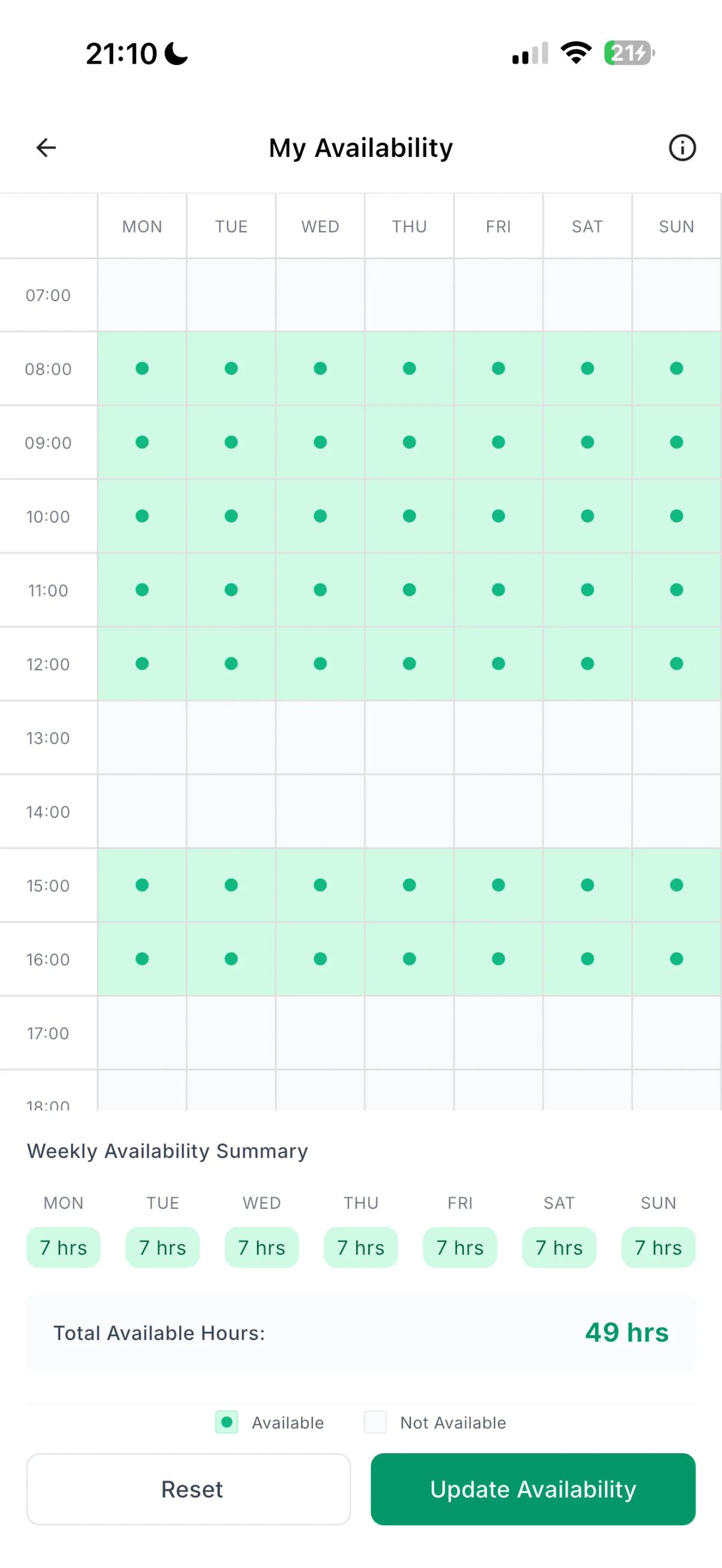
Availability is one part of that test. An actual VOLOCOACH availability screenshot is shown above; it is not Alex's account or evidence of his hypothetical workload.
For VOLOCOACH-specific change conditions, use the current FAQ and cancellation and rescheduling policy. Do not infer a product rule from the way another tool behaves.
Keep a short decision record
For each tool, write down:
- The lesson formats you tested and any gaps.
- The confirmation and payment steps you observed.
- How a change is requested, accepted and finalised.
- The complete charges, their sources and the date checked.
- What the learner needs to do.
- How you can access the records you need.
For the fictional Alex, an unclear change process remains an unresolved issue even if a tool looks cheaper. He should resolve that issue in a demonstration before moving bookings.
Common comparison questions
Should I choose the tool with no subscription charge?
Check the complete charges first. No subscription charge does not mean there are no transaction fees or paid features. Then test whether the booking process fits the lessons you sell.
Does a calendar mean a tool supports packages?
Not necessarily. Check how individual package lessons, changes and applicable conditions are represented. Our lesson-management guide explains the records to keep clear.
Explore the volocoach coach overview to understand the product, then verify your essential requirements before choosing a tool.
Keep the useful ideas. Lose the admin.
Explore volocoachKeep reading

The hidden cost of booking sports lessons over WhatsApp
Measure the admin behind chat-based lesson bookings, use a worked weekly example, and test a clearer process for times, payments and changes.
Read more : The hidden cost of booking sports lessons over WhatsApp
Single lessons, weekly bookings and packages: a coach's practical guide
Keep lesson plans, confirmed times, payments and changes connected, using a worked example of single, weekly and package lesson records.
Read more : Single lessons, weekly bookings and packages: a coach's practical guide